
My Monitor, Homes and Cottages
Your whole property on one screen.
Solar, battery, generator, propane, heat and breakers, read every minute. You hear about a low tank, a tripped breaker or a filter that’s due before it becomes a cold night.
Connects to the equipment you already have. More brands on request
See it on your screen
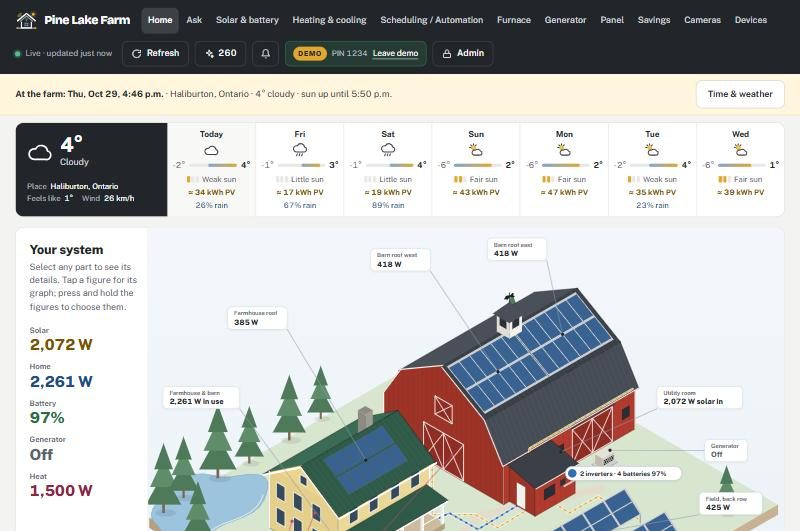
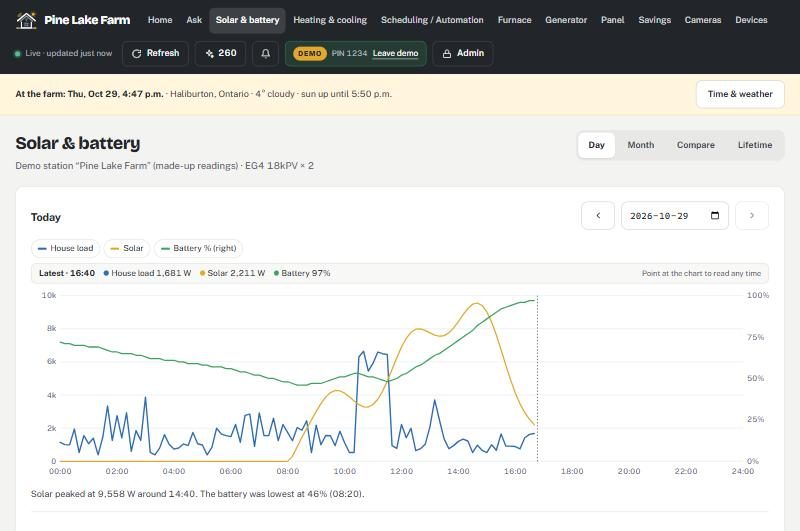
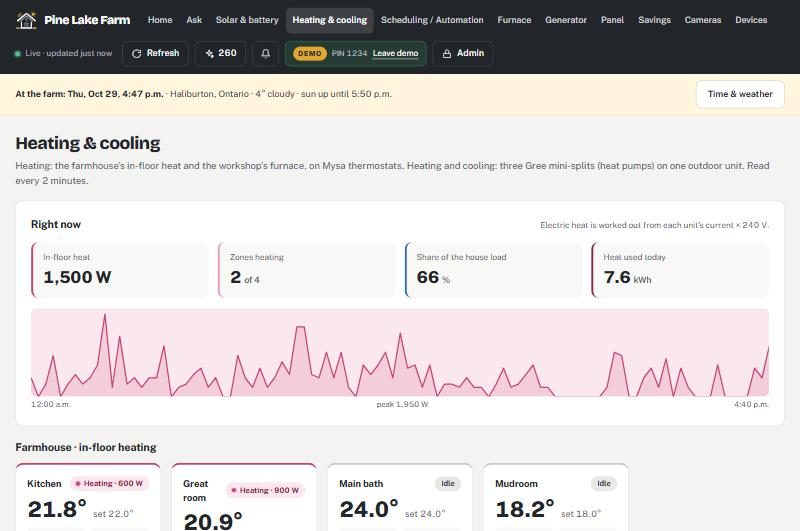
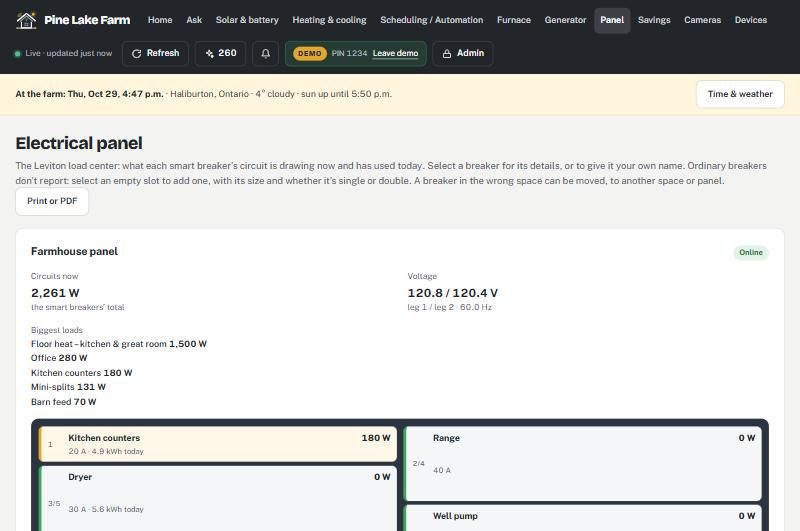
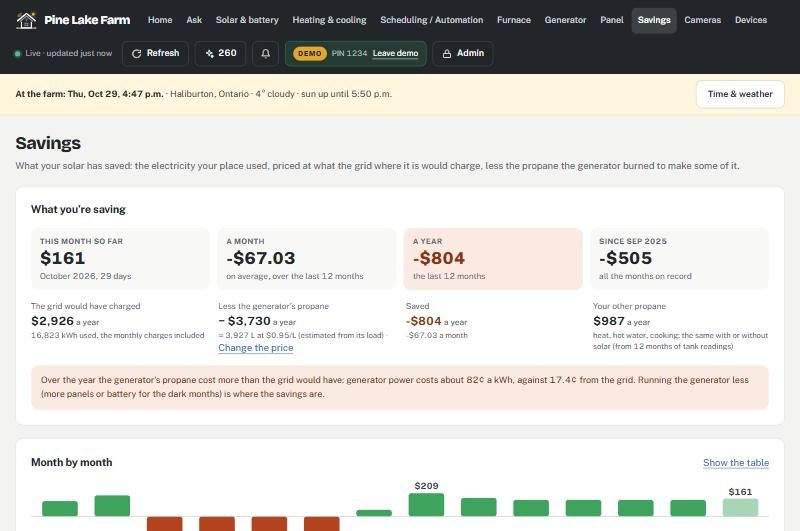
Your whole place, read every minute. Swipe through a few of the screens.
What it watches
It reads your equipment through the apps it already talks to, so there is nothing to rewire. Each system gets its own page, and Home shows the lot at a glance.
Solar and battery
Every panel string and inverter, the battery’s charge, voltage and cell temperatures, and when it will be full at today’s sun and tomorrow’s forecast. It flags an array that falls behind the others.
Generator
Each run: when it started, how long it ran, what it made and roughly how much propane it burned. Oil changes come due by running hours, the way the manual counts them.
Propane
Tank level from your tank monitor, how fast you’re using it, how many days are left and what is burning it: furnace, generator or both.
Heating and cooling
Thermostats and mini-splits room by room, with set points you can change from your phone, and running hours for every head and outdoor unit.
Breakers
Live power on every smart breaker, what is drawing the most right now, and a warning the moment one trips.
Maintenance
Filters, oil and anything else you add, each on its own window of running hours or months. Log the work for one unit or several at once and the clock restarts.
Alerts
When something needs you, you hear about it by email or text, as you choose. Short blips don’t wake anyone, quiet hours are respected, and you’re told again when it’s back to normal.
New in Homes & Cottages
Short videos of what’s new, each under 35 seconds and silent. They’re recorded on the live demo: a made-up farm with made-up readings, so try any of it there yourself.
Your system, your way
Tap Solar, House or any figure and its graph opens for 30 seconds. Press and hold the figures to choose which show and in what order, and add one breaker to keep an eye on.
Ask about your home
Ask in plain words: how much the water heater used last week, which panels did better this month, when to run the dryer. It looks the figures up in your own records and says how it got them.
Schedules made of schedules
Put “Away” and “Back home” together into one, run it at a time or when the readings say so, such as a dull day ahead. Where two would change the same thing, you pick which wins.
A printed breaker legend
A legend for the panel door from the breakers’ own names: three styles, any size, ready to print or save as a PDF.
Rearrange the panel
Moved a breaker in the real panel? Move it on screen too, or swap two, and every reading follows it.
The wall screen
A tablet on the wall: the time and weather, the battery, the house’s power and what needs attention, big enough to read across the room.
AI credits
Your credits are always in view. 150 come each month with your plan, unused ones roll over for six months, and more are a tap away.
For installers
Your name, logo and colour on your clients’ monitors, and 25% of what they pay. The portal shows every payment. See the installer program.
Put it on your wall
Your whole place, across the room, on a screen you may already have. No special tablet to buy.

- A screen you already own. Any tablet with a browser works, an Amazon Echo Show or a Fire tablet included. A good wall display can cost around a hundred dollars.
- Big and glanceable. The battery, solar, the house, heating and whatever needs attention, sized to read from across the room.
- Looks after itself. It stays up to date, keeps the screen awake, dims at night and brightens at a tap, and shifts a little so nothing burns in.
- Included with every plan. The wall screen is part of My Monitor. Choose portrait or landscape and the size in your settings, then open it on the tablet.
How to set it up In your settings, make a view-only link, then open it on the tablet. No sign-in, and it never signs out.
Built on a working off-grid home
The monitor runs every day at our own property in rural Ontario, where the power has to work through a Canadian winter. Every alert in it exists because something needed watching there first.
- 56solar panels on six arrays, across two inverters
- 5battery packs in one bank
- 1propane generator for the dark weeks, and a propane furnace
- 4mini-splits, in-floor heat, and a panel of smart breakers
Getting started
We set it up with you. You keep your equipment and its own apps; the monitor reads from them.
-
Tell us what you have
Inverters, batteries, thermostats, mini-splits, tank monitor, breakers. A short call is usually enough.
-
We connect it
Your own private address, such as
yourname.stoll.cc, set up with your equipment’s sign-ins and nobody else’s data. -
Open it anywhere
On your phone or computer. Choose your alerts and maintenance windows, and it lets you know when something needs you.
Everyone sees it. Few can change it.
Share it with the family without handing over the power system.
Viewing
Anyone you give access to sees every reading and alert. Nothing can be changed.
Household PIN
Change temperatures and log maintenance. It locks again ten minutes after the last change.
Owner sign-in
Inverter settings and breakers need the full sign-in, and every change is written to a log.
How your equipment connects
Most of what you own joins My Monitor on its own. A few things need a small part we add. Tell us what you have and we’ll tell you which is which, before you decide, so there are no surprises on your bill.
Connects on its own
Your solar and battery, smart thermostats, mini-splits, tank monitor and smart breakers link up once you sign in with the equipment’s own app. Nothing to install.
A small add-on
Some gear was never built to report on its own, like a garage door or a water heater. We fit a small, low-cost part right at the equipment so it can connect, and be controlled.
The home hub
A few things only talk on your local network, like certain sensors or cameras. One small always-on hub at home reads them and reports in. If you have cameras, the same hub covers those.
$199 CAD, one time
Reads your solar inverter and battery straight off the unit, every couple of seconds. On your own network, with no cloud account: a live dashboard and open data (MQTT, Home Assistant), no internet needed; email alerts need an internet connection to send. An optional $8/month upgrade adds text alerts, forecasting, savings and the full app. EG4, Sol-Ark, Deye, Growatt, Luxpower and Victron.
$379 CAD, one time
Reads your IKEA hub, sensors and backup cabinets on your network and reports to the monitor. Fanless and silent, with on-site backup and instant recovery built in. No cameras.
$599 CAD, one time
Everything the MPV Bridge does, plus cameras: live video, snapshots and motion alongside your sensors. More power and a faster network port, and it comes back on by itself after a power cut.
Already have a mini-computer? Run the Bridge software on your own box (the Solar Bridge software is $59 one-time; the sensor and camera Bridge is $8 a month or $79 a year), kept updated and supported the same way. Full specs, what each one connects to, and ordering on the MPV Bridge page.
Pricing
New homes start free for 30 days, no card. After that, one price per property. Pay monthly, or yearly and get two months free. No contract: stop any time. Every price is the same number in US or Canadian dollars, Canadians pay in CAD, about 30% less.
Watch
$29 a month · USD or CAD · or $290 a year
Our most complete plan: we watch it with you and call you when something’s wrong. Everything in Essentials and Plus, plus our eyes on it too.
- Every system on one screen: solar, battery, generator, propane, heating, breakers
- History, charts and the battery outlook
- Maintenance reminders by running hours
- Alerts by email and text, with quiet hours and alert levels for each person
- Ask about your home: 150 AI credits a month
- Up to 10 people
- MyProViewer gets your critical alerts too, and calls you
- A check-up each spring and fall
- First in line for help
Plus
$18 a month · USD or CAD · or $180 a year
Texts that reach you anywhere. Everything in Essentials, plus alerts by text and settings for each person.
- Every system on one screen: solar, battery, generator, propane, heating, breakers
- History, charts and the battery outlook
- Maintenance reminders by running hours
- Alerts by email and text
- Quiet hours and alert levels for each person
- Ask about your home: 150 AI credits a month
- Up to 10 people
Essentials
$12 a month · USD or CAD · or $120 a year
Everything on one screen, and an email when something needs you.
Free for 30 days, no card
- Every system on one screen: solar, battery, generator, propane, heating, breakers
- History, charts and the battery outlook
- Maintenance reminders by running hours
- Alerts by email, and “not heard from” when the internet or power drops
- Ask about your home: 150 AI credits a month
- Up to 3 people
Watch it yourself
$199 CAD once · or $59 for the software on your own mini-computer
The MPV Solar Bridge reads your solar inverter and battery right on your own network, every couple of seconds. No monthly plan, no cloud account.
- Your solar and battery, read locally on your own network
- Live dashboard and open data (MQTT, Home Assistant), with no internet needed
- Email alerts when something needs you (sending these needs an internet connection)
- EG4, Sol-Ark, Deye, Growatt, Luxpower and Victron
- Yours to keep, with no subscription
- Optional $8 a month upgrade: text and on-call alerts, forecasting, savings and the full app
| Feature | Essentials$12 / mo | Plus$18 / mo | Watch$29 / mo | Watch it yourself$199 once |
|---|---|---|---|---|
| Reads your solar & battery locally, on your own network | — | — | — | ✓ |
| Works without internet (dashboard & open data) | — | — | — | ✓ |
| Open data: MQTT & Home Assistant | — | — | — | ✓ |
| Generator, propane, heating & breakers too | ✓ | ✓ | ✓ | — |
| Live dashboard, history & charts | ✓ | ✓ | ✓ | ✓ |
| Battery outlook (forecast) | ✓ | ✓ | ✓ | $8/mo |
| Email alerts | ✓ | ✓ | ✓ | ✓ |
| Text alerts | — | ✓ | ✓ | $8/mo |
| Quiet hours & alert levels per person | — | ✓ | ✓ | $8/mo |
| Maintenance reminders (running hours) | ✓ | ✓ | ✓ | — |
| Ask about your home (AI, 150 credits/mo) | ✓ | ✓ | ✓ | $8/mo |
| People | Up to 3 | Up to 10 | Up to 10 | You |
| We watch it and call you | — | — | ✓ | — |
| Spring & fall check-ups | — | — | ✓ | — |
| Price | $12/mo | $18/mo | $29/mo | $199 once · $59 software |
| Start free | Choose Plus | Choose Watch | Solar Bridge |
“Watch it yourself” is the local-only MPV Solar Bridge shown above: your inverter and battery on your own network, no subscription. Full specs and ordering on the MPV Bridge page.
Setup (optional)
Free to do yourself, step by step, with help docs for each piece of equipment. Or have us do it for $199 once: we connect your equipment, set the alerts with you and check it after the first week.
Your own address
$5 a month, or $50 a year. Your monitor at a name of your own, like sunnyhill.stoll.cc.
More than one place
Half price after the first. Each property has its own plan; the second and every one after it costs half. One sign-in sees them all.
AI credits
150 a month with your plan, and 75 more for each extra property, in one balance. One credit is one answer, and unused ones roll over for six months. More: 250 for $3 or 500 for $5. Refer a friend and you both get 300 that never expire.
Remote training
$100 an hour. A video call to walk you, your family or your caretaker through the monitor and its alerts.
On-site visit
From $250. We come to your place, check the equipment and connections, and set things up with you. Travel beyond 50 km quoted first.
Sensors
Put in by a local installer. We don’t install sensors: a local electrician or installer does, and we’ll tell you which ones work with My Monitor.
Paying
By card, through Stripe. Nothing is charged until your monitor is running. Cancel any time from your account.
Installers: put your name on it and earn 25% of what your clients pay. See the installer program.
Prices before tax. Texts reach mobile numbers in Canada and the US. Equipment not on our list yet? We add brands as customers need them: see what works now and what’s on request.
My Monitor, Industrial and Commercial
Running a business?
UPS and backup power, generators, coolers, tanks and meters at every site, with alarms that go to the next person on call until someone answers. From $35 a month a site.
Want this for your place?
Sign up, then set it up yourself, step by step: tick what equipment you have, connect each one with the sign-in from its own app, and stop and come back whenever you like. Or look around first: the live demo is a made-up farm with every feature, and you can change anything.
or email [email protected]